Digital signage in smart logistics offers warehouse crews a unified look at active tasks. A screen near receiving might list appointment updates. Monitors at a pick face display the upcoming wave. They also highlight target quantities and urgent priorities. Meanwhile, a dock scheduling display points drivers toward open bays. Such brief updates cut down on radio chatter. They keep choices right where the work happens.
Ask yourself one core question. Can your warehouse display system convert live data into instant actions? If so, real-time visuals join the daily flow. They function perfectly alongside scanners, conveyors, and the warehouse management system.
Why Do Smart Logistics Warehouses Need Real-time Visuals?
Warehouse work changes minute by minute. Orders arrive, trailers move, labor shifts, and exceptions appear. A static poster cannot carry those changes. Real-time visuals give each zone a current, readable instruction while supervisors keep a wider view of inventory visibility and flow.
Turning System Data into Floor-level Actions
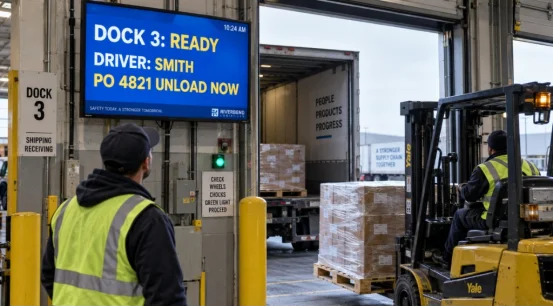
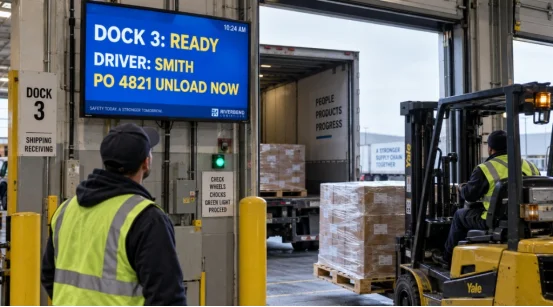
Your warehouse management system integration can send order waves, location data, replenishment calls, and service levels to a central content platform. The platform converts selected fields into short messages, color states, or queue numbers. A picker sees “Aisle 4, bin 18, 6 units.” A receiver sees “PO 4821, door 3, unload now.” The display shows the decision, while the source system keeps the transaction record.
Keep each screen focused. Three to five data points usually fit a fast glance. Use the same color meaning across zones, and add a text label so color is not the only signal. That consistency helps new staff during a busy shift.
Supporting Safety and Shift Handover
An industrial digital signage unit can show pedestrian routes, forklift restrictions, PPE reminders, or a live stop message. Supervisors can publish a safety alert to several zones at once, then clear it when the hazard is resolved. At shift change, a short board can show open picks, late trailers, blocked locations, and the next owner.
The result is a cleaner handover. The outgoing team leaves a visible state, and the incoming team starts with the same facts.
Which Warehouse Tasks Benefit from Digital Signage?
Start with points where people wait, walk, or make repeated choices. Those points produce clear measures and make the value of logistics digital signage easy to test.
Picking, Packing, and Dock Scheduling
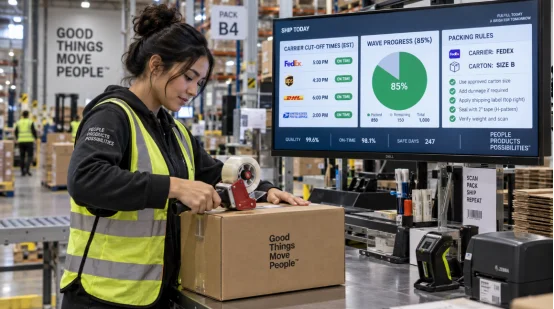
At picking stations, a screen can display wave status, tote destination, and replenishment needs. In packing, it can show carton rules, carrier cut-off times, and quality checks. Near the yard, a dock scheduling display can list door assignment, trailer status, and loading sequence.
These views support warehouse picking accuracy because the instruction sits beside the work. Pair the display with barcode scans and exception prompts. A screen should guide the next step, while the scan confirms what happened.
Inventory, Andon, and Exception Alerts
An Andon board gives a zone a shared signal for a blocked conveyor, missing stock, printer fault, or quality hold. Use a simple state such as “open,” “assigned,” and “cleared,” with the time and owner visible. Inventory displays can show replenishment thresholds and cycle-count queues while access rules keep sensitive order details off the floor.
Exceptions deserve priority over decoration. If a message does not change a task, remove it from the rotation. People trust a screen that helps them act.
What Should You Check in a Logistics Display System?
Hardware and software must fit the actual warehouse space. Map the whole path from data source to screen. Spot any network dead zones. Also, plan for cleaning, mounting, and ongoing support tasks.
Brightness, Viewing Distance, and Enclosure
An LED warehouse display requires correct brightness. It has to handle skylight glare, aisles, and cameras. Find the farthest viewing spot. Then, select pixel pitch and text size. Check the enclosure rating against dust, moisture, temp shifts, and wash-down zones. Lastly, confirm mounting, cable guards, and service access before installation.
For indoor zones, commercial panels may fit. Loading bays and cold areas often need industrial digital signage hardware with wider operating ranges and stronger protection. A readable screen at the wrong height still creates wasted walking.
Data Connections and Content Control
Ask how the warehouse display system receives data: API, webhooks, database views, message queues, or a local edge gateway. Define refresh intervals, offline behavior, user roles, and audit logs. The display should keep the last approved message during a short network outage and show a clear stale-data time.
Content control also matters. Operators need templates for queue numbers, alerts, and shift notes. A central administrator should set permissions, while local leads can update approved fields. Test the system with real event volumes before rollout.
How Can You Measure Warehouse Efficiency after Deployment?
Set a baseline for each pilot zone, then compare the same measures after two to four weeks. A warehouse KPI dashboard can combine system data with simple observations from the floor.
Throughput, Dwell Time, and Error Tracking
Track picks per labor hour, dock dwell time, replenishment response time, order cycle time, and mis-pick rate. Record radio calls, walking distance, and manual status checks during sample periods. If a display changes a queue or alert, mark the event and its resolution time.
A useful test might target a 10% reduction in dock dwell time or a measurable fall in repeated status calls. Set the target before installation so the result has a clear reference.
Pilot Zones and Continuous Review
Choose one picking area, one packing line, or one dock cluster. Train supervisors, collect feedback at the end of each shift, and adjust message length or placement. Review screen uptime, stale-data incidents, and content changes each week.
After the pilot, expand by process. Keep the same naming, colors, and alert states across the building. Smart warehouse technology works best when operators see one operating language.
How Can YIAISIGN Support Real-time Logistics Displays?
The display choice should follow the task, environment, and data path. YIAISIGN provides commercial and industrial display options through its product range and company site. For logistics teams, the relevant capability is the ability to specify screen size, brightness, mounting format, touch or non-touch operation, and enclosure needs around a real warehouse zone.
You can share viewing distance, ambient light, temperature range, network method, and the fields that must appear on screen. That brief helps match a panel or LED solution to receiving, picking, packing, or dock control. Ask for a sample layout and test it at the actual viewing point. A short field trial often reveals glare, text size, and mounting issues that a desk review misses.
FAQ
Q1: How does digital signage improve warehouse efficiency? A: It places current work instructions, queue status, and exception alerts near the task. Teams spend less time asking for status and can respond to changes sooner.
Q2: Can logistics digital signage connect to a warehouse management system? A: Yes. Common paths include APIs, webhooks, database views, message queues, and edge gateways. Define refresh rate, permissions, offline behavior, and stale-data labels before deployment.
Q3: Which metrics show the effect on warehouse picking accuracy? A: Compare mis-pick rate, scan exceptions, order cycle time, picks per labor hour, and replenishment response time before and after the pilot.
Q4: What hardware suits a loading dock? A: Check brightness, viewing distance, operating temperature, dust and moisture protection, mounting, cable routing, and service access. An LED warehouse display may suit long sightlines.
Q5: How should you start a smart warehouse technology project? A: Select one zone with a visible delay or exception problem, set a baseline, connect approved data fields, run a two-to-four-week pilot, and review results with operators and supervisors.