A buyer can approve a sharp 15.6-inch sample and still face failures at the customer’s desk. The screen may work through HDMI while touch needs a second USB cable. One laptop may send video and power through USB-C; another may provide data only. These details shape returns and support tickets.
Commercial touchscreen portable monitors need a written specification covering the display, touch system, ports, power, stand, cables, packaging, and tests. For wholesale portable monitor sourcing, the approved sample and specification should match down to the cable set and firmware version.

What Should You Define before Requesting a Quote?
A useful request for quotation starts with the monitor’s job. The supplier can then identify a platform, custom parts, and required development.
Start with the Commercial Use Case
Describe the host devices, software, working hours, viewing distance, lighting, and user behavior. Meeting rooms may need wide viewing angles and a stable stand. Field work may call for low power use and a protective cover. Customer-facing terminals may need stronger glass and fixed mounting.
State whether users will tap controls, enter signatures, draw, or use gestures. These tasks affect touch-point count, response, glass thickness, surface finish, and palm rejection. A 15.6-inch touchscreen monitor for menu selection has a different brief from one used for annotation.
State the Order and Delivery Requirements
Give the target market, forecast, first-order quantity, delivery date, packaging limits, and compliance documents. Request separate prices for samples, pilot units, and mass production to expose tooling charges and component minimums.
List the package contents. A quotation may include USB-C and HDMI cables, a power adapter, and a cover, or only the screen.
Which Custom Specifications Matter Most?
Custom portable monitor specifications should use measurable values and named tests. Terms such as high brightness need a numeric requirement, tolerance, and inspection method.
Touch Panel and Cover Glass
Specify capacitive touch, touch points, active area, edge accuracy, and gestures. Add cover-glass thickness, hardness target, surface treatment, border color, and logo position. Record whether touch data uses the video cable or a separate USB connection.
Touch input commonly follows the USB Human Interface Device structure. The official USB HID specifications define digitizer and touchscreen usages for host testing. Request a compatibility list and test the devices your customers use.
Display, Housing, and Stand
Record screen size, resolution, panel type, brightness, contrast, color coverage, viewing angle, refresh rate, and pixel criteria. A 1920×1080 IPS panel keeps Full HD content readable from wider angles.
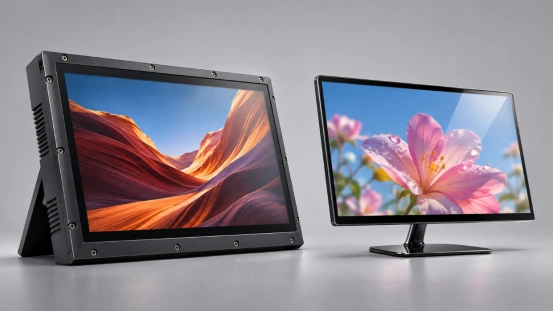
Set the finished dimensions, weight limit, material, color, buttons, speakers, stand angles, mounting needs, and cover design. A smart cover protects the screen during transport and supports it on a desk. A dedicated adjustable stand provides more viewing angles.
Ports, Power, and Device Compatibility
Define every port and its job. USB-C may carry video, data, and power; the connector shape leaves those functions open. Official USB Type-C product guidance states that protocols and power capabilities vary by product. Test video, touch data, available power, cable capability, and HDMI fallback.
For a USB-C portable monitor, state the video mode, input power range, pass-through power, adapter rating, and cable specification. Test low-power hosts too. Limited host power can reduce brightness or reset the connection.
How Should You Evaluate a Wholesale Supplier?
A portable monitor supplier should turn your use case into a controlled sample supported by engineering records and production checks.
Review a Working Sample and Written Specification
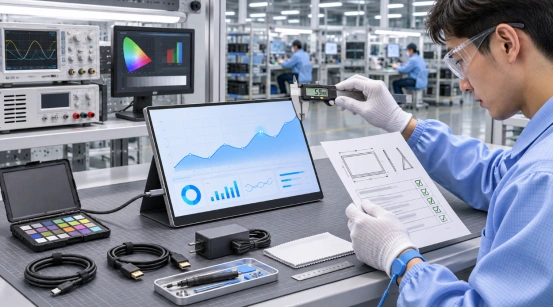
Test a sample with the exact host-device matrix. Compare size, weight, brightness, touch points, ports, cables, stand angles, and package contents with the quotation. Check the on-screen menu language, controls, reset behavior, and defaults.
Ask the portable monitor OEM to identify standard and custom parts. Record the panel, touch controller, board, firmware, housing, cables, and adapter in a controlled bill of materials. Set written limits for approved alternatives.
Run Compatibility and Reliability Tests
Test cold start, sleep and wake, reconnection, rotation, touch accuracy, gestures, full-load brightness, and long operating sessions. Test every cable. A weak cable can turn a good screen into a return.
Match reliability checks to the sales environment. Cover connector insertion, stand cycling, buttons, abrasion, temperature, vibration, carton drops, and packed-product inspection. Approve methods and pass criteria before the pilot order.
What Changes the Unit Cost and MOQ?
Quotation gaps often come from different components. A line-by-line specification reveals which options drive price and minimum quantities.
Panel and Touchscreen Choices
Panel size, brightness, color target, refresh rate, touch points, glass, controller, and bonding affect price. Custom glass printing and sensor shapes may require tooling. A standard 15.6-inch format usually offers more established component choices.
Tooling, Branding, Accessories, and Packaging
Housing molds, button layouts, colors, startup graphics, menus, labels, manuals, cartons, and cables add work. Separate one-time charges, unit costs, and optional accessories in the quotation.
What Should You Confirm before Mass Production?
Commercial touchscreen portable monitors need a clear handoff from sample approval to production. The handoff should preserve the approved display behavior, touch response, housing, accessories, firmware, and packaging.
Approve a Golden Sample and Locked BOM
Sign and date the final sample. Attach the specification, drawings, bill of materials, firmware, packaging, labels, and test results. Keep one sample with the buyer and one with the factory. Physical samples capture color, fit, stand tension, and surface details.
Set Inspection and Change-Control Rules
Define incoming checks, in-process tests, aging time, cosmetic limits, and pre-shipment sampling. Require written approval for changes to the panel, controller, board, firmware, cable, adapter, or glass. Final inspection should draw units from different cartons, pallets, and production periods.
How Can a Product-Based Specification Reduce Sourcing Risk?
YIAISIGN provides a base for commercial portable-display projects: a 15.6-inch FHD 1920×1080 IPS screen, USB-C and HDMI, plug-and-play operation, wide viewing angles, low power use, and structures with a smart cover or adjustable stand. The cover protects the screen in transit and supports it on a desk.
You can review the portable monitor range and use the standard platform as the starting point for a touch request. Send the required touch points, cover glass, host-device list, port behavior, power plan, housing details, branding, cable set, packaging, and order forecast. YIAISIGN can then confirm which items are standard, which require validation, and which affect tooling or quantity.
FAQ
Q1: What Is a Typical MOQ for a Custom Touchscreen Portable Monitor?
A: The MOQ depends on the panel, touch sensor, cover glass, housing, packaging, and component supplier terms. Ask for separate quantities and prices for samples, pilot production, and repeat orders.
Q2: Can Video, Power, and Touch Work Through One USB-C Cable?
A: Yes, when the monitor, host port, and cable support the required video, data, and power functions. Confirm each function in the specification and test the intended host devices.
Q3: What Should You Test on a Multi-Touch Portable Monitor Sample?
A: Check touch-point count, edge accuracy, gestures, sleep and wake behavior, reconnection, display quality, power stability, every port, all cables, stand movement, and packed-product protection.
Q4: Which Features Can Be Customized for Wholesale Orders?
A: Common requests cover touch configuration, cover glass, housing color, logo, startup image, menu language, stand, cables, packaging, labels, and manuals. Feasibility and minimum quantity depend on the selected platform.
Q5: How Do You Keep Mass Production Consistent with the Approved Sample?
A: Lock the bill of materials and firmware, retain signed golden samples, define inspection limits, test across production periods, and require written approval before any component change.