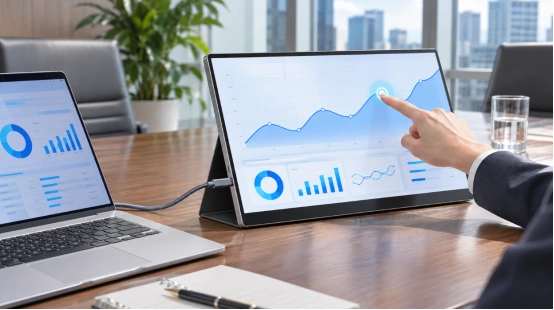
Industrial LCD displays often cost a lot more money. This happens because the maker adds special parts, heat control, testing, and custom changes. They also keep helping you with spare parts later on. If the screen is very bright or works in extreme heat or cold, the price goes up even more.
When you do an industrial LCD vs consumer display comparison, look at where you will put the screen first. The word “industrial” covers many different things. Because of this, you should ask for clear facts and proof for your exact model. A higher price always needs a good technical reason.
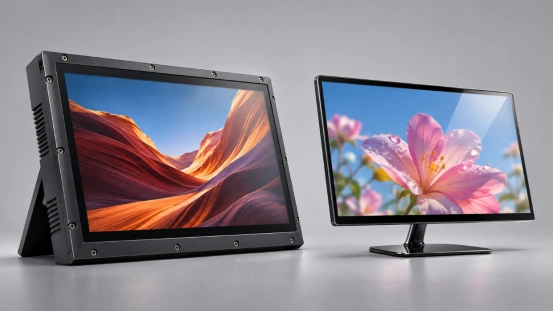
Why Does an Industrial LCD Cost More Than a Consumer Screen?
The cost of your industrial display depends on its main job. A front desk screen and a factory machine screen might have the exact same picture quality. But, they need very different wires, mounts, and tests.
How many units they make also matters a lot. Big consumer brands build millions of screens. This spreads out the cost of making tools and new designs. A special setup has fewer buyers and is made in small batches. You should ask how much the price drops if you buy more. Also, ask for a basic model price. This shows if the high quote just comes from a small order size.
Panel Selection Is Only the Starting Point
The screen panel changes the industrial LCD display price a lot. Things like brightness, viewing angles, and heat limits matter. The rules about dead pixels also change the cost. If you need touch glass and special clear glue, the factory has to use more materials and time.
Just looking at the resolution is not enough. A 32-inch all-in-one unit and a big 65-inch art display can both have 1920×1080 resolution. Yet, people look at them from different distances, and they mount to the wall in completely different ways.
Power, Touch, and Interfaces Must Work as a System
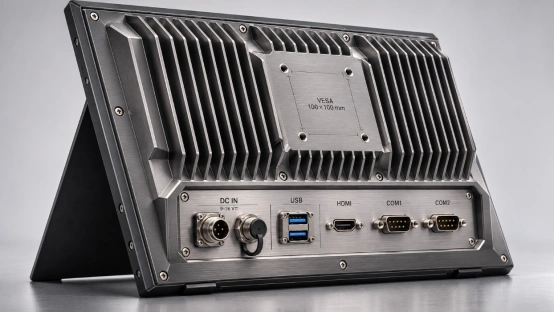
The brain chips, power plugs, touch glass, and software must all work perfectly together. The factory must test them as a whole system. Where they put the plugs changes how your cables fit. The metal mounts change how steady the screen is and how easy it is to fix later. Even a simple stand changes how you set it up.
A portable monitor with USB-C and HDMI does a totally different job than a fixed commercial digital signage display with remote content management. You must compare the whole package. This means looking at the software and all the extra parts together.
How Do Duty Cycle and Operating Conditions Affect Price?
Your running schedule and the room conditions tell you which design features are worth the money. Tell the maker exactly how many hours it runs each day. Also, share the room heat and how the screen will hang on the wall.
24/7 Operation Changes Thermal Design
A 24/7 commercial display needs a special heat design. It must run all day and night without stopping. The light in the back, the air moving inside the case, and the power load all change how hot it gets inside. Ask the maker how they tested this. Check what their warranty says about running non-stop.
Keep in mind that a 24/7 rating only means it can stay on a long time. It does not mean the screen is safe from dirty factory dust, hard shaking, or super high heat. You must check those safety limits separately for the exact model you want.
Brightness and Environment Need Measurable Limits
A high brightness LCD display needs a much stronger back light. It will use more power and need better cooling. Tell the factory the exact brightness in cd/m². Also, describe how sunny or bright the room is.
If your commercial display screens sit in dust or wet spots, you must ask for special shielding. Make sure to tell them if this shield covers just the front glass or the whole box. Testing for heat, water seals, and shaking can make the screen cost more. Always ask the factory which tests are included in their price.
Why Do Customization and Lifecycle Control Add Cost?
Special project engineering and part promises add extra costs on top of the basic building work. You should split these fees up. This lets you see if they are actually worth it for the total number of screens you plan to buy.
Small Batches Carry More Engineering Work
A custom LCD display solution might need new screw holes, moved plug spots, special touch glass, or new software. Smart engineers have to make new drawings, test samples, metal tools, and building steps for this. If you only order a few screens, the cost of all this hard work is split among fewer units.
Ask them to list the fees for engineering, new tools, and the basic screen price on their own lines. Make sure you agree on who owns the design drawings. Find out what they will charge if you want to make changes later on.
Stable Components Reduce Redesign Risk
A screen built to last for years needs a clear, written plan for parts and changes. Swapping a panel or a green board can mess up how the case fits. It can also break the software or fail safety tests.
Saving extra parts, testing backup pieces, and keeping old notes takes a lot of time and work. Ask the maker for a solid promise on part supply. Find out how much warning they give before changing a part, and how they will fix problems. Treat these rules as firm contract needs that you must check.
When Is a Consumer Screen Still the Better Choice?
A consumer screen is sometimes fine for easy daily use. This works well if the room has good air conditioning, the mount is simple, and you can swap the screen easily. Just make sure the warranty allows you to use it for a business.
Compare the starting price against the cost of power, repair work, and broken-down time over the years. Do not forget to count the cost of buying spare screens. Look at your own past repair notes to guess these costs. If you put the screen inside a kiosk box, you must make sure a worker can actually reach it to fix it.
How Can You Compare Display Quotes on Equal Terms?
Give every industrial display manufacturer the exact same list of needs. Tell them the size, resolution, brightness, daily running hours, and room heat. List your needs for touch, plugs, software, mount size, total number, selling country, and warranty.
Ask them to break down the prices for engineering, tools, testing, safety papers, boxes, and spare parts. Make sure the papers match your exact model and setup. Agree on how you will judge the test sample. This includes counting dead pixels and seeing how it turns back on after a power cut. Every cost on the bill should tie back to a clear need you can check.
If they charge for a test, ask what exact test they do. Ask how long it takes, how many units they test, and what score passes. A testing fee must give you something real, like a paper report showing your exact setup passed.
How Can You Match Display Cost to Project Risk?
Looking at specific models gives you a great place to start. YIAISIGN lists a 15.6-inch 1920×1080 IPS portable monitor with USB-C and HDMI. They also show 21.5-inch and 32-inch 1920×1080 art frames with remote management. The 21.5-inch art frame is built for 24/7 operation.
Their 23.6-inch and 32-inch all-in-one product descriptions say they can change the hardware and software for you. These choices let you talk about your plug needs, software rules, and box sizes when getting a price. For dirty or hot factory rooms, ask for the exact heat limits and safety ratings of your model. Always get test reports and part lifespan rules before you say yes to a build.
FAQ
Q1: How Much More Do Industrial LCD Displays Cost?
A: You cannot just guess a standard extra cost. Brightness, room dirt, touch needs, order numbers, testing, and part promises all change the final price tag. Always compare matching features side by side.
Q2: Does Higher Resolution Explain the Price Premium?
A: Resolution is just one single feature. Heat control, safe running limits, touch glass builds, and long-term part help also add a lot to the price.
Q3: Does Every Commercial Project Need a 24/7 Screen?
A: No. Just pick a run time that covers your real daily hours, including any night shifts. Make sure you check the safe room heat and warranty rules for that exact rating.
Q4: Can a Consumer Screen Work in a Kiosk?
A: It might work well. But it depends on the air flow, the metal mounts, plug space, warranty rules, and repair limits. Always test the screen inside the final kiosk box to be sure.
Q5: What Should You Request Before Paying an Industrial Premium?
A: Ask for the exact model details and a broken-down price list. Get test scores for your sample, needed safety papers, part-change rules, and clear written warranty terms.