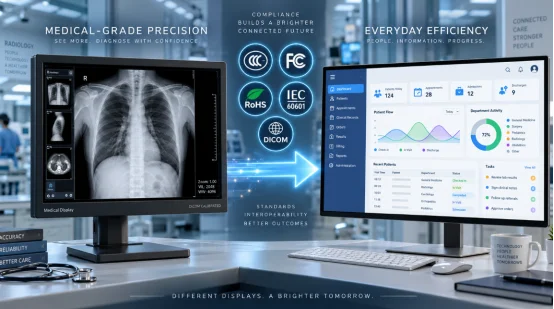
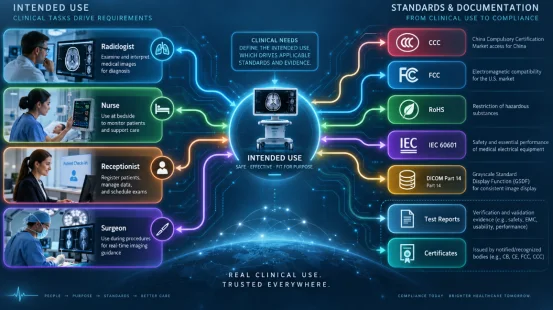
The choice between medical grade displays vs. consumer monitors starts with intended use. A reception screen, bedside information terminal, surgical video display, and radiology reading station carry different image, safety, cleaning, and regulatory needs. Your purchasing team should define the clinical task first, then match each certificate and test report to the final model.
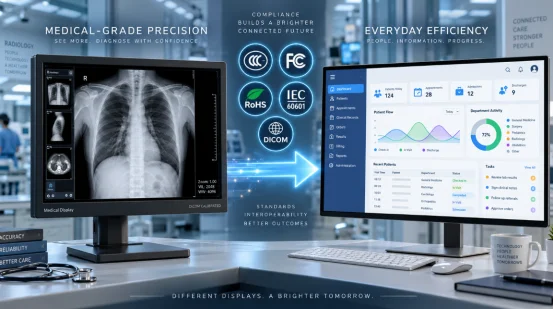
Why Does the Display’s Intended Use Set the Compliance Path?
The phrase “medical display” covers several jobs. A screen may show appointment details, patient education, vital-sign trends, endoscopic video, or diagnostic images. Each job changes the risk. A missed gray detail on a radiograph has a different consequence from a delayed cafeteria message.
Classify the screen as diagnostic, clinical review, procedure support, or general information. Record the installation country, power supply, wireless functions, cleaning chemicals, operating hours, mounting method, and connection to other equipment. This short brief gives your supplier and compliance team a usable starting point.
What Do CCC, FCC, and RoHS Cover?
These three requirements answer separate questions. Medical display compliance needs a market-by-market file because a logo on a label only covers the scheme, model, and scope named in its supporting record.
CCC for China Market Access
CCC certification for monitors applies when the product falls within China’s compulsory certification catalogue and relevant implementation rules. The route can cover product safety and electromagnetic compatibility, with certified models identified by name and model. Check the current catalogue classification, certificate status, factory details, power adapter, and permitted model family before shipment.
FCC Rules for Electromagnetic Emissions
FCC compliance for displays addresses radio-frequency emissions in the United States. A digital display can act as an unintentional radiator. Wi-Fi, Bluetooth, or another transmitter adds intentional-radiator requirements. Ask for the test report, authorization route, responsible-party details, model identity, and module records. A certified wireless module still leaves the finished host product with integration, labeling, and emission duties.
RoHS Controls for Restricted Substances
RoHS compliance limits ten substances in electrical and electronic equipment placed on the EU market, including lead, cadmium, mercury, hexavalent chromium, two brominated flame-retardant groups, and four phthalates.
Useful evidence includes a declaration, bill-of-material review, supplier material declarations, and test data for high-risk parts. Cables, solder, plastic housings, coatings, and the external adapter all belong in the review.
Which Clinical Standards May Apply Beyond Market Access?
CCC, FCC, and RoHS support market access and product controls. A display used as medical electrical equipment or as part of a medical electrical system may need added safety, EMC, risk, and image-performance evidence based on its intended purpose.
IEC 60601 Safety and EMC
IEC 60601-1 handles core safety. It also sets essential performance rules for medical electrical equipment. Meanwhile, IEC 60601-1-2 manages electromagnetic emissions, detailing immunity within clinical spaces. Reviews frequently check leakage current, insulation, and protective earth.
They test temperature, mechanical stability, and power cuts, alongside electrostatic discharge, radiated RF, and local wireless gear. The exact test setup is crucial. Adapters, cables, ports, enclosures, and accessories all count.
DICOM Grayscale Performance
DICOM Part 14 outlines the Grayscale Standard Display Function. This standard displays grayscale images reliably. Diagnostic medical displays often feature built-in calibration. They also add luminance tracking, uniformity control, and quality-assurance software.
Standard tasks utilize 10-bit grayscale with 1,024 levels. Their working luminance sits near 400 to 500 cd/m². View these numbers as rough guides. Always agree on firm limits with your clinical team. For instance, a mammography reading room demands stricter specs than a standard ward station.
How Do Medical Grade Displays and Consumer Monitors Compare?
The following medical monitor vs consumer monitor table turns broad product labels into purchasing checks.
| Checkpoint | Medical Grade Display | Consumer Monitor | What You Should Verify |
|---|---|---|---|
| Intended task | Diagnostic, clinical review, or procedure support | Office, home, media, or general information | Written intended use and risk class |
| Grayscale | DICOM-calibrated workflow may apply | Standard factory image modes | Calibration method and acceptance report |
| Luminance | Stable target with monitoring may apply | Rated peak brightness | Calibrated luminance and uniformity |
| Electrical safety | Medical electrical requirements may apply | General IT or AV safety route | Exact standard and power configuration |
| EMC | Emissions plus healthcare immunity tests may apply | Market emission requirements | IEC 60601-1-2 test setup and pass criteria |
| Cleaning | Sealed controls and compatible surfaces may apply | Household cleaning guidance | Approved disinfectants and ingress design |
| Quality records | Calibration logs and traceable revisions | Standard warranty records | Serial, panel lot, firmware, and service logs |
What Should You Request Before Approving a Display?
A strong medical display procurement checklist connects every claim to a document, test, or sample. It also keeps engineering changes visible after approval.
Match Documents to the Exact Model
Request the product specification, label artwork, current certificates, full test reports, RoHS declaration, critical-component list, adapter data, wireless module records, firmware revision, and change-control process.
Match model numbers across every file. Confirm whether enclosure, touch glass, cable length, adapter, or wireless module changes require added testing. A report for a similar-looking screen cannot confirm the configuration you plan to buy.
Test the Finished Workflow
Run the actual image source, workstation, cable, mount, and room lighting. Check startup, signal recovery, grayscale steps, touch accuracy, viewing angle, fan noise, surface temperature, and cleaning.
For diagnostic use, document calibration and periodic quality checks. A two-screen workstation also needs consistent orientation, resolution, and luminance behavior. Small differences become tiring during a long reading shift.
A Practical Route from Display Platform to Healthcare Use
Once intended use and evidence are defined, the supplier discussion becomes specific. YIAISIGN’s display range includes portable monitors, Android all-in-one displays, digital signage, and related screen platforms that can support patient information, wayfinding, ward dashboards, and other non-diagnostic healthcare interfaces.
For a custom project, ask YIAISIGN to map screen size, brightness, touch stack, ports, enclosure, adapter, firmware, and mounting details to your test plan. Its configurable display categories give product teams a practical base for interface and mechanical development.
The finished model still needs the certificates and clinical evidence required by its intended use and destination. Use the company contact route to share the application brief, required standards, sample test list, and document checklist at the start.
FAQ
Q1: Can a consumer monitor be used in a hospital?
A: Yes, for suitable general-information tasks when the facility accepts its safety, EMC, cleaning, mounting, and service profile. Diagnostic and patient-connected workflows need a separate risk and standards review.
Q2: Does an FCC mark make a display medically compliant?
A: FCC records address radio-frequency requirements for the U.S. market. Medical electrical safety, healthcare immunity, image quality, and local device rules follow separate paths.
Q3: Is RoHS a product safety certificate?
A: RoHS controls restricted substances in electrical and electronic equipment. Electrical safety and EMC evidence come from their applicable standards and conformity routes.
Q4: Does every medical display need DICOM Part 14?
A: DICOM grayscale calibration is relevant to grayscale medical imaging workflows. Patient information screens and many administrative displays use different image acceptance criteria.
Q5: What is the first document to request from a display supplier?
A: Start with a model-specific specification and compliance matrix. The matrix should list intended use, destination market, applicable standards, certificate numbers, test reports, accessories, and open gaps.