You need a stable Android motherboard solution that works with the final LCD, touch controller, enclosure, power supply, peripherals, and firmware. When comparing an Android motherboard for custom touch display projects, look past processor speed. Will the screen wake correctly? Will touch stay accurate? Can the supplier repeat the same build next year?
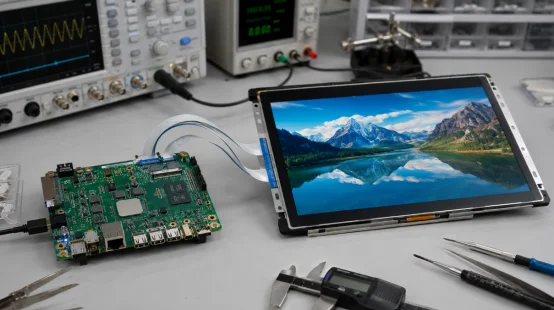
What Makes an Android Motherboard Stable?
Stability has three parts: hardware, software, and production control. Miss one, and a custom touch display motherboard may pass the sample stage but fail after deployment.
Hardware and Thermal Design
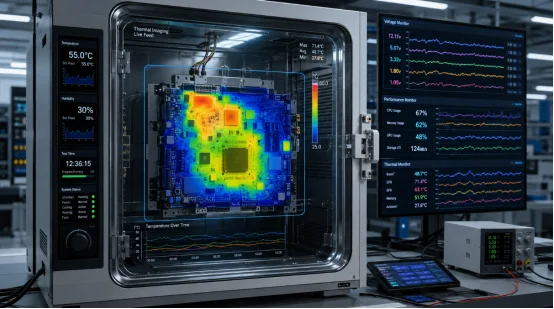
An industrial Android motherboard needs steady power delivery, suitable memory, protected I/O, and sensible Android motherboard thermal management. Test it inside the final enclosure. A board that runs cool in free air may throttle behind a sealed 32-inch panel.
For an industrial Android board for 24/7 operation, check boot cycles, heat rise, storage errors, and recovery after power loss. A stable Android board for commercial display use should restart cleanly without a technician pressing buttons. Industrial boards are commonly selected for their stability, environmental adaptability, expandability, watchdog functions, and support for long-hour operation.
Software and Production Control
Strong Android BSP support covers the kernel, display timing, touch drivers, peripheral APIs, and bug fixes. Ask about Android motherboard OTA update methods, rollback, logs, and an Android motherboard with watchdog support.
Production stability also needs Android motherboard BOM control, fixed firmware versions, and written Android motherboard lifecycle management. An Android motherboard for mass production should not change memory, wireless modules, or connectors without notice.
What Should You Define Before Asking for a Quote?
A clear requirement sheet saves more time than another round of price negotiation. Before asking how to choose an Android motherboard, define the complete device.
Screen, Touch, and Mechanical Fit
Record the panel model, resolution, brightness, touch controller, cable direction, and enclosure depth. This is the practical answer to how to choose a motherboard for a touch screen.
Touch screen motherboard compatibility needs more than “USB touch supported.” Test edge accuracy, multi-touch, wake-up recovery, glove use, and long presses. Android board display and touch compatibility should be verified with the exact panel and controller you will buy.
A compact device may use an Android motherboard with MIPI display. Mature industrial panels often use an Android motherboard with LVDS interface. Newer panels may need an Android motherboard with eDP interface, while an Android motherboard with HDMI output suits external screens and quick prototypes. Display interfaces, touch support, serial connections, GPIO, wireless modules, and video output should be reviewed as one system rather than separate specifications.
Performance and Interfaces
Choose RAM and storage from the actual app load. A simple menu terminal may work with 2GB or 4GB RAM. Video, dual-screen content, cameras, or local databases need more. The best Android motherboard for custom touch display equipment keeps enough headroom without adding needless heat and cost.
List every port. You may need an Android motherboard with multiple USB ports, an Android motherboard with RS485, an Android motherboard with GPIO, or an Android motherboard with CAN bus. Remote sites may require an Android motherboard with 4G support. Retail and office devices commonly need an Android motherboard with WiFi and Bluetooth.
The Android all-in-one machine range shows why this system view matters: commercial touch devices combine the board, display, touch layer, audio, housing, and application environment.
What Software Support Should You Require?
Hardware gets the first meeting. Software usually decides whether the project ships. That is where schedules often slip.
BSP, Drivers, and Device Control
Ask what Android versions are stable, what source code is available, and who handles Android motherboard driver development. Display timing, touch adaptation, rotation, brightness, camera support, and serial APIs should be discussed before sample approval.
Android motherboard firmware customization may include boot logo, launcher, kiosk mode, automatic app start, disabled navigation keys, scheduled restart, and recovery settings. Android motherboard hardware customization can change PCB size, interface position, power input, memory, or mounting holes. Together, these services form useful Android motherboard customization, not just a new logo.
The supplier’s hardware customization options cover size, shape, resolution, brightness, viewing angle, touch functions, structure, I/O, power, and protective features. Those details affect the final enclosure.
How Can You Test Reliability Before Mass Production?
Do not approve a board after a ten-minute demo. Android motherboard prototype testing should use the final screen, touch panel, power adapter, housing, camera, scanner, printer, speaker, network, and serial equipment.
A Practical Test Plan
Run Android motherboard reliability testing for repeated cold boots, app loops, video playback, touch input, network loss, USB hot plug, power cuts, and sleep recovery. Check case temperature. A 72-hour run is a useful start, though demanding projects may need longer.
Keep one approved golden sample. Record the PCB revision, Android image, settings, and peripheral models. Tiny detail, big relief.
For a long lifecycle Android motherboard, ask about Android motherboard long-term supply, end-of-life notice, replacement parts, and last-time-buy planning. An OEM Android motherboard or custom Android motherboard project also needs clear sample approval and change control. An Android motherboard OEM ODM program should define ownership of drawings, firmware, tooling, and test limits.
Which Applications Need Different Priorities?
An Android motherboard for commercial devices should match the job, not a generic “high-performance” label. Interface count matters more in a vending unit. Heat control matters more in a sealed wall panel.
Common Project Types
An Android motherboard for kiosk and an Android motherboard for self-service terminal need accurate touch, USB, printers, scanners, and kiosk mode. An Android motherboard for industrial HMI may need serial ports and a watchdog. An Android motherboard for digital signage or an Android motherboard for retail display needs strong video output and remote updates.
Other cases include an Android motherboard for vending machine, Android motherboard for access control, Android motherboard for medical display, Android motherboard for smart home panel, and Android motherboard for smart display products. Each needs a different acceptance test.
A 15.6-inch touch display example lists 1920 × 1080 resolution, 10-point capacitive touch, long-hour operation, and options for brightness, touch, housing, waterproofing, and a battery module.
What Makes a Supplier Useful Beyond the Sample?
A capable Android motherboard supplier should connect board choices with screen behavior, housing, software, and repeat production. An industrial motherboard manufacturer that only sends a datasheet leaves too much integration risk with you.
YIAISIGN approaches the issue from the finished smart-display side. Its product information covers Android all-in-one machines, digital signage, portable monitors, and related display formats. It describes OEM and ODM support for hardware design, interfaces, appearance, packaging, and software services.
Its 32-inch Android all-in-one machine lists a 1920 × 1080 panel, Android 11 with an Android 13 option, low-power operation, and hardware plus software customization. That combination lets buyers check motherboard selection against the complete display device, not an isolated PCB.
FAQ
Q1: How Do You Choose an Android Motherboard for a Touch Screen?
A: Match the LCD interface, resolution, touch controller, power input, ports, software, enclosure, and test plan. Then validate the complete device.
Q2: What Is Android BSP Support?
A: Android BSP support covers the kernel, hardware drivers, display settings, touch support, APIs, and firmware maintenance needed for the board.
Q3: How Much RAM Does a Commercial Touch Display Need?
A: Simple single-app terminals may use 2GB to 4GB. Video, dual displays, cameras, or heavy apps may need 4GB to 8GB or more.
Q4: How Can You Secure Long-Term Supply?
A: Freeze the BOM and firmware, request change notices, confirm component lifecycle, and agree on an end-of-life plan before volume orders.
Q5: Is the Fastest Processor Always the Best Choice?
A: No. A faster processor may add heat and cost. Stable drivers, correct interfaces, enough memory, and repeatable production often matter more.