Retail teams are giving screens jobs that sit close to the sale: showing an offer at the right hour, pointing a shopper to a product, or replacing a message when stock changes.
These digital signage trends for retail turn a display into a shared retail tool. For digital signage for retail stores, the useful test is simple: does each message help a shopper or store team take the next action?
Why Does AI Content Scheduling Matter for Retail Digital Signage?
Retail digital signage can follow conditions that already shape a store day. A breakfast message, a weather-sensitive product, or a queue notice has a short useful window. Put the rule in the schedule before the shift begins, then give the store team a clear owner for exceptions.
AI-Driven Content Scheduling
AI-driven content scheduling uses inputs such as time, local weather, footfall, and inventory status to select content. A retailer can set a rain-probability trigger for outerwear, run meal offers around local meal times, or reduce promotional load during a busy checkout period. Keep the rules visible to the people who approve promotions. A screen should never become a mystery box on the sales floor.
Start with one campaign and one signal. Compare the scheduled message with its display time, product availability, and sales result. That small pilot gives you a useful content rulebook before more screens join the network.
How Does Real-Time Inventory Integration Keep Messages Accurate?
An advertised item needs a clear path from the screen to the shelf. When product data changes, the display needs a matching action. This is where a data connection earns its place in a retail project.
Connected Digital Signage and Availability
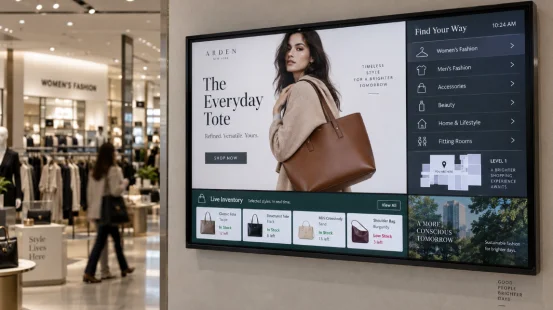
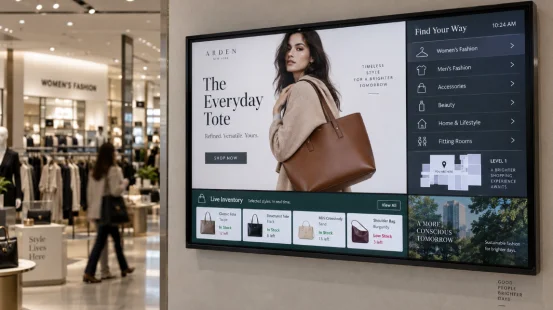
Real-time inventory integration lets connected digital signage show current availability, aisle location, pickup status, or a substitute category. A connected display can also pause a campaign when the system records zero sellable units. That protects staff from repeated stock questions and gives shoppers a more accurate cue.
Define the refresh interval, source system, approval rules, and stale-data label before launch. A five-minute refresh may fit a slow-moving category. Fast-selling items near checkout may need a shorter interval. The product and store workflow set the right number. A small pilot can confirm it.
When Does Live Content Earn Attention?
Live material works when it gives shoppers a reason to stay in a zone for a few more moments. A grocery demonstration, an in-store event feed, or a product launch stream can support the merchandise nearby. The content still needs a plan for sound, captions, rights, and an end time.
Live Retail Content Near the Product
Live retail content belongs where the subject and the product meet. A cooking demonstration can sit near the ingredients. A launch stream can sit near the featured devices. Keep an adjacent content slot for price, product location, or staff assistance, so a visitor who pauses also sees a practical next step.
Measure dwell time, nearby unit sales, staff questions, and playback issues during the event. Those measures tell you whether live programming deserves another slot on the calendar.
How Do Multi-Zone Display Layouts Use Store Space?
One screen can carry several useful signals when the hierarchy stays clear. A shopper should be able to read the main message while passing, then find detail during a pause. Multi-zone display layouts give each part of that job a fixed area.
A Practical Screen-Zone Comparison
| Zone | Typical Content | Refresh Pattern | Store Measure |
|---|---|---|---|
| Main Area | Offer or featured product | Campaign schedule | Product sales |
| Side Panel | Wayfinding or category location | When layout changes | Direction requests |
| Bottom Strip | Queue, event, or stock status | Live feed or timed rule | Wait-time questions |
Keep the largest type in the main area and reserve the smallest text for people standing close. Screen distance matters more than a dense creative file. A well-placed side panel can save a surprising amount of pointing from store staff.
Why Does Centralized Multi-Location Management Matter?
Chains need a common campaign calendar, while stores need room for local hours, events, and inventory. Centralized multi-location management gives both groups a working process when permissions and content templates are defined early.
Retail Display Management Across Stores
Retail display management can group screens by region, store, department, or device type. Head office can publish a campaign pack, while a store manager changes the opening-hours panel or event tile. Keep an audit trail for publishing and a fallback playlist for network loss. These details matter on a Saturday afternoon, which is usually when a weak process shows itself.
Track publishing time, offline devices, local overrides, and content expiry. The record helps you measure whether the network supports the store routine. Across all five trends, retail digital signage works best when content, commerce data, and screen ownership follow the same operating rhythm.
Display Hardware for a Changing Retail Floor
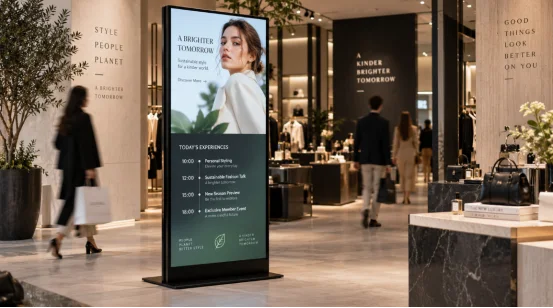
Content plans set the job for the hardware. A schedule that changes at noon, pauses an unavailable product, and carries a side-panel direction needs a display format that fits the location and the content zones.
YIAISIGN develops digital signage, Android all-in-one machines, and advertising machines for commercial display projects. Its product range provides a starting point for matching screen size, orientation, touch requirements, and installation needs to retail digital signage solutions. That match helps a procurement team connect the physical display to its publishing workflow and store layout. Review the digital signage range when defining the screen brief, or visit YIAISIGN for its commercial display categories.
FAQ
Q1: Which digital signage trends for retail should you test first?
A: Start with a single message tied to one measurable condition, such as time of day, inventory status, or an event. Record the content schedule, product availability, and the store measure you want to improve.
Q2: Can real-time inventory integration work with existing retail systems?
A: It can connect through an approved data feed, API, database view, or middleware service. Define data ownership, refresh timing, permissions, and the screen action for missing data before publishing.
Q3: How many content zones should one retail screen have?
A: Use the number that supports the viewing distance and shopper task. A main promotion plus a narrow wayfinding or status area often gives a clear layout for a passing shopper.
Q4: What should you measure for digital signage for retail stores?
A: Match the measure to the screen job. Product sales, dwell time, direction requests, queue questions, campaign publishing time, and device uptime can each show a different part of the result.
Q5: Does centralized multi-location management remove local store control?
A: The platform can assign publishing roles by region, store, department, or screen group. A central team can manage shared campaigns while authorized local users publish local hours, events, and inventory messages.