A commercial display can look perfect during a five-minute demo and still fail after hours of use. That is why a commercial display aging test belongs inside a broader commercial display quality inspection system. Before a product leaves a commercial display factory, you want proof that its main systems work together.
When comparing commercial display products, ask: how are commercial displays tested before shipment? A solid answer should cover incoming checks, assembly control, commercial display testing, aging, final pre-shipment inspection, and traceable records.

Why Do Aging Tests and Pre-Shipment Inspections Matter?
Quality control before shipment is not just about scratches. A loose connector can survive assembly. An unstable board may play a short video without trouble, then restart after hours of heat. These are the problems a screen aging test is meant to reveal.
Catching Early Failures
A display aging test can expose intermittent black screens, flicker, unstable power, touch drift, abnormal restarts, and heat-related faults. A display burn-in test may also reveal pixel or backlight issues that a quick startup check misses.
Reducing Field Costs
A failure after installation can mean replacement freight, service visits, store downtime, or a frozen menu. Good digital signage quality control moves that risk back to the factory.
What Is a Commercial Display Aging Test?
A commercial display aging test is an extended operating check on a finished or nearly finished display. It is not simply turning the unit on, seeing a picture, and packing it.
Aging Test vs. Basic Power-On Test
A power-on test checks startup. A display burn-in test checks behavior over time. During commercial display testing, the screen may play video, show solid colors, change brightness, connect to a network, respond to touch, and recover after restart or power loss.
How Long Does Testing Take?
Buyers often ask, “how long is a commercial display aging test?” There is no useful one-size-fits-all number. Test time should match the product, duty cycle, thermal design, customer specification, and factory control plan.
How Does the Commercial Display Quality Control Process Work?
A commercial display quality control process should follow the product from incoming material to packing. A stronger commercial display factory quality control process also controls versions, so the approved sample and production batch do not quietly end up with different panels, boards, or firmware.
Step 1: Check Materials and Order Specifications
LCD display quality inspection starts with the panel, backlight, mainboard, power supply, cables, touch panel, glass, housing, and connectors. The factory should also confirm size, resolution, brightness, software, ports, mounting, accessories, and custom requirements.
Step 2: Control Assembly Details
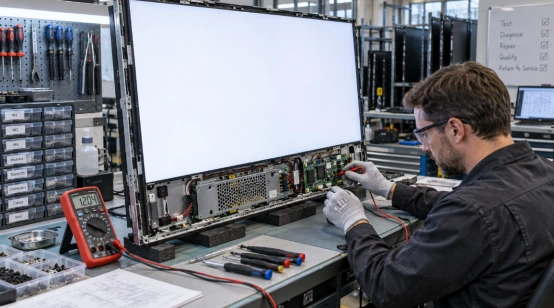
Factory quality inspection should check cable routing, connector locks, screw fastening, grounding, alignment, cleanliness, and heat paths. For touch products, bezel or gasket pressure can create ghost touches after final assembly. A sharply bent cable may pass today and fail after shipping. Small detail, expensive problem.
For projects with special brightness, touch, glass, ports, power, or housing needs, hardware customization options should be reviewed before mass production because each change can affect testing.
Step 3: Run Functional and Aging Checks
Test the unit as a system. Typical checks include RGB, white, black, and low-brightness screens; video playback; touch at edges and corners; Wi-Fi or Ethernet recovery; required ports; repeated restart; and long-run thermal behavior.
What Problems Can an Aging Test Detect?
A display aging test is useful because some faults need time, heat, or repeated input before they appear. Your commercial display inspection checklist should record both the fault and what happened after repair.
Common Faults to Watch
Targets include dead or stuck pixels, light leakage, Mura, uneven brightness, color shift, flicker, black screens, overheating, unstable power, touch failures, app crashes, and unexpected reboots. System-based displays should also be checked for network recovery, automatic app startup, storage behavior, and firmware stability.
If a unit is repaired, it should be rechecked before packing. Detect, repair, retest, release.
What Should a Pre-Shipment Inspection Include?
A pre-shipment inspection should confirm that the finished product matches the approved specification and is fit to ship. This is the final gate in commercial display pre-shipment inspection, not a substitute for earlier process control.
Final Product Checks
A practical digital signage pre-shipment inspection checklist can cover model and configuration, appearance, pixel condition, brightness, color, touch, ports, network, software version, accessories, labels, serial number, and packaging. Electrical or environmental checks may also apply based on the product and destination market.
Published quality testing and validation information shows why you should ask whether checks cover display performance, touch functionality, durability, and environmental adaptability, not appearance alone.

What Quality Records Should You Request?
Ask for the QC result, serial or batch number, test date, relevant firmware or board version, aging status, rework history, and packing confirmation. For a custom order, a commercial display inspection checklist tied to the approved specification is more useful than a generic “passed” sticker.
Test photos or videos can add context. They do not replace inspection data, but they help show that the agreed quality control before shipment took place.
How Can You Judge a Commercial Display Factory?
A capable commercial display manufacturer should explain what is tested, when it is tested, what counts as failure, and what happens after rework. Ask whether commercial display testing covers the complete unit in its final housing. Also ask how digital signage quality control handles firmware, touch calibration, interfaces, thermal behavior, and production changes.
“Everything is tested” sounds nice. A real test flow is better.
What Does a Practical Supplier Quality System Look Like?
Once you know what should be tested, check whether a supplier can connect design choices with repeatable production control. A change in glass, mainboard, touch, brightness, or enclosure can create a new failure mode.
YIAISIGN publishes capabilities across digital signage, all-in-one displays, touch functions, hardware customization, software integration, sampling, testing, and production. Its quality information states that each display unit goes through checks covering display performance, touch functionality, durability, and environmental adaptability, with batches checked before delivery.
It also supports customization of resolution, brightness, viewing angle, interfaces, power, protective glass, touch features, and structure. For a sourcing project, that range matters because product configuration and validation can be considered together instead of treating testing as a last-minute step.
FAQ
Q1: What is aging test for LCD display?
A: It is an extended operating test used to expose faults that may not appear during a short startup check, including flicker, heat-related instability, pixel defects, power problems, or touch failures.
Q2: How long is a commercial display aging test?
A: The duration depends on product design, duty cycle, customer requirements, and the factory test plan. Ask for the actual standard used for your model.
Q3: How are commercial displays tested before shipment?
A: They are typically checked through material inspection, assembly control, functional testing, screen aging test procedures, final pre-shipment inspection, configuration verification, and packing checks.
Q4: What should a commercial display inspection checklist include?
A: It should cover model, appearance, display quality, brightness, touch, interfaces, network, software, aging status, accessories, serial tracking, and packaging.
Q5: What is the difference between a display aging test and a display burn-in test?
A: The terms are often used closely in display manufacturing. Both focus on extended operation, but exact test content and acceptance criteria should come from the factory’s written quality plan.