What Is a Capacitive Touch Screen?
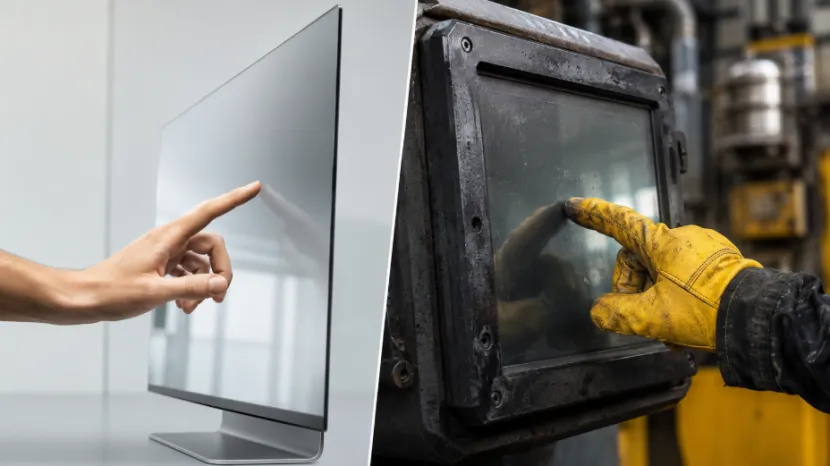
A capacitive panel notices a change in its electrical field. This happens when something that carries electricity touches the glass. Most of the time, this is just your finger. It feels even a very light touch. Because of this, it lets you swipe, zoom in, and use many fingers at once.
Why Buyers Choose Capacitive Touch
A capacitive touch screen supplier is a great choice for certain things. You pick them when you want clear pictures, fast speed, and a fresh look. Our product knowledge base shows a few cool items. For example, there is a 10.1-inch Wi-Fi digital photo frame. It features five-point capacitive touch. We also have 15.6-inch models. These come with ten-point capacitive touch. Furthermore, these screens let you share things without wires. You can easily change how bright they are. They even turn the picture by themselves.
This tech is perfect for a custom touch screen display. Shops, schools, and photo places love using it. Public info boards use it too. People today expect a public screen to act just like their smartphone. If it lags even a little bit, users might think the kiosk is broken.
What Is a Resistive Touch Screen?
A resistive panel works by feeling a push. It spots pressure when two special layers press together. You can press it with a finger. A stylus pen works well, too. You can even wear a normal work glove. Mostly, it only reads one touch at a time. However, that is fine. It is plenty for machines that have big buttons and easy menus.
Why Industrial Buyers Still Use Resistive Touch
A resistive touch screen supplier might be a smarter pick for rough places. This includes big machines, warehouses, and medical tools. Food packing plants and spots near loud motors need them, too. A resistive touch screen for glove operation is super helpful. A worker can type in data. They never have to take off their safety gear. Also, invisible electric waves do not mess it up easily. Capacitive panels, on the other hand, might act crazy near big motors unless they have a shield. But remember, resistive screens need a harder push. They do not look quite as clear. Plus, they use a soft top layer. This top can wear out over time if pushed too hard.
Capacitive vs Resistive Touch Screen: Which One Fits Your Project?
Picking the right screen depends on the actual job. You should not just pick what sounds newer. Let us compare a capacitive vs resistive touch screen for industrial use. First, think about gloves, dirt, and water. Next, look at how hard the menu is to use. Ask yourself how often people will touch it. Finally, think about what happens if the machine breaks down.
Key Buying Differences
Capacitive screens usually allow five to ten touch points. They also let more light shine through. This makes them look brighter. Resistive screens, however, take almost any kind of pressure input. They also cost less money at the start. A glass capacitive screen might live longer in a busy store. But a resistive screen saves precious time in a factory where everyone wears gloves.
Your industrial touch panel also needs a few other things. It needs good brightness and a smart controller. The enclosure, operating system, and mounting parts matter a lot. A super cheap panel is a bad idea. It stops being cheap if the drivers break or you cannot find spare parts.
Where Do These Touch Screens Work Best?
Planning touch screen applications is easy. You just need to match the screen to the real person using it. Think about the room setting, too. The device should fit right into the normal workday. It should never force workers to change their habits.
Commercial and Self-Service Applications
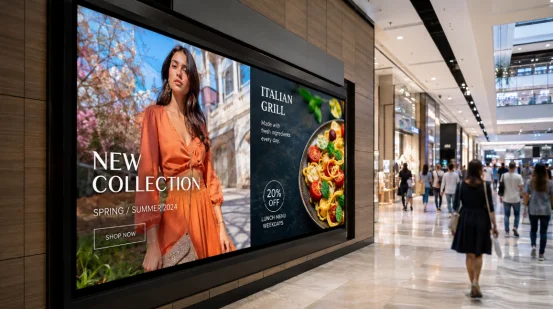
A capacitive touch screen for digital signage is great for busy places. You see them in malls, hotels, and airports. They fit well at big shows and in fun retail displays. Our knowledge base talks about digital signage for ads and maps. They show public news and live updates. People also use them to serve themselves.
A custom touch screen supplier for self-service kiosks needs to talk with you. They should ask about the screen angle and the enclosure. Cleaning rules and software flow are important to discuss. In places like restaurants, hospitals, hotels, and government halls, these screens do a lot. All-in-one terminals can handle food orders and room bookings. They help with checking in, paying bills, and finding facts.
Smart Factory and All-in-One Applications
A touch screen display for smart factory equipment is very useful. It can show how fast things are being made. It tells you if a machine is running well or broken. It shows quality data, inventory, and maintenance alarms. Safety instructions pop up there, too. The knowledge base also mentions warehouse logistics. It talks about preventive maintenance, production analytics, and employee training.
An Android touch screen display is neat. It puts the screen, operating system, processor, and connections all in one unit. The knowledge base lists 23.6-inch, 27-inch, and 32-inch machines. They feature a sharp 1920 × 1080 resolution. They do not use much power. You can change the hardware or software for commerce, education, and industrial automation.
An OEM Android all-in-one touch screen supplier must check something first. They need to know the exact touch technology before giving a quotation. Sometimes, product notes talk about touchscreen functions. However, they forget to state if the panel is capacitive or resistive.
How to Choose an Industrial Touch Screen?
Start by looking at the real operating facts. Do not just read a generic specification sheet. Give the touch screen manufacturer a short application brief. Then, ask for a sample. Make sure the sample matches the final environment.
Build a Practical Specification
Write down exactly what you need. State the size, resolution, and brightness. List the touch points and glove type. Say if you need a stylus, the interface, and the operating system. Mention the temperature range, IP target, runtime, and order volume. For an OEM touch screen, cover the glass thickness and logo. Talk about the housing, firmware, mounting, and packaging.
Also, ask about controller availability and drivers. Check on testing, warranty, and replacement planning. A good B2B touch screen supplier will question vague requirements. Just saying “glove use” is incomplete. Thin medical gloves and thick oil-resistant gloves behave very differently.

About YIAISIGN
YIAISIGN is a Shenzhen display manufacturer. They have more than 15 years of industry experience. They make lots of things. Their range covers digital photo frames, calendar clocks, and digital art frames. They also build all-in-one machines, digital signage, portable monitors, and advertising displays.
The company states its 3,000-square-meter facility runs four production lines. They have a daily capacity of 3,000 units. They hold ISO9001 certification. They also meet CCC, FCC, RoHS, and CE compliance. Plus, they offer OEM/ODM, software, hardware, and supply services. This big mix matters a lot. It is super important when one project needs a screen, enclosure, software setup, packaging, and repeat supply.
FAQ
Q1: What Is the Main Difference Between a Capacitive vs Resistive Touch Screen?
A: Capacitive touch likes light, multi-point gestures. Resistive touch reacts to real pressure. It works great with fingers, gloves, and styluses.
Q2: Which Industrial Touch Screen Is Better for Gloves?
A: Resistive is a safer bet for thick or non-conductive gloves. Capacitive panels need a special glove mode. They also need real glove testing first.
Q3: Is Capacitive Touch Better for Self-Service Kiosks?
A: Usually, yes. It gives people a fast response. The visuals look clear. Also, the familiar gestures feel normal to them.
Q4: What Should You Send a B2B Touch Screen Supplier?
A: Send them the exact application, size, and resolution. Tell them the touch method, system, and environment. Also, list the interfaces, quantity, and customization list.
Q5: Can an Industrial Touch Panel Be Customized?
A: Yes. Common choices include the cover glass, housing, and logo. People also pick a specific controller, firmware, mounting, ports, brightness, and packaging.