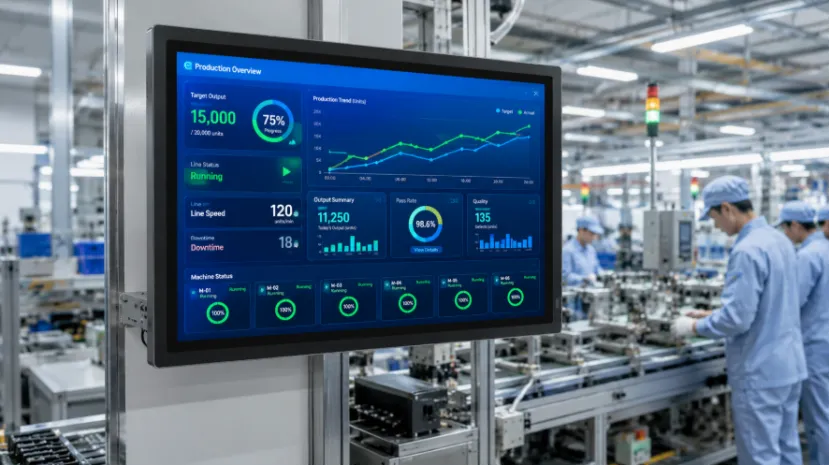
Smart factories do not only need machines that run faster. They also need factory data that workers can see, check, and act on at the right time. In many workshops, production plans sit in one system, machine alarms stay on another panel, and work orders are still printed on paper. That gap makes daily management harder than it should be.
An Android all-in-one machine can work as a fixed screen and touch terminal on the factory floor. It helps bring production data, equipment status, work orders, and workshop notices closer to the people who need them. For smart factory digital management, this kind of display is not a decoration. It becomes a simple, visible part of factory operations.
Equipment Problems Need Faster Visual Alerts
A clear equipment monitoring display helps show machine status such as running, idle, alarm, maintenance, or offline. For a line leader, seeing a red alarm on a large screen is much faster than finding out after the production count drops.
What Is an Android All-in-One Machine in a Smart Factory?
An Android all-in-one machine is more than a basic monitor. It combines a screen, Android system, touch control, and app-running ability in one unit. In smart factory projects, it can be used as an all-in-one touchscreen computer for data display, task checking, and simple interaction.
More Than a Display Screen
A normal display can show information, but it often needs another player or computer. An Android touchscreen display can run factory dashboard software, web pages, APKs, notice boards, training content, and work order pages. That makes it easier to place at production lines, inspection stations, material areas, or workshop entrances.
A Fixed Terminal for Factory Floors
For many workshops, handheld devices are not always practical. Gloves, dust, busy hands, and shift changes can make small mobile screens easy to miss. A fixed Android all-in-one machine for smart factory use gives operators a shared point to check the latest status.
How Do Android All-in-One Machines Support Production Data Dashboards?
Factories often care about one simple question: is the line running according to plan today? A large screen answers this faster than a report opened on someone’s office computer. It is a small detail, but in a noisy workshop, small details matter.
Real-Time Production Progress Display
An Android display for production data dashboard can show daily target, completed quantity, cycle time, order number, and line progress. A 32-inch screen is easier for several workers to read at once, especially when the display is placed above a workstation or near the team board.
Quality and Defect Data Display
The same screen can also show defect categories, inspection results, rework quantity, and quality warnings. When an issue appears repeatedly, workers can see it earlier and adjust the process before more products are affected.
How Can Android Displays Improve Equipment Monitoring?
Machine-side display is another common use. Operators do not always need a complex control station. Sometimes they just need a clear page that says what is running, what has stopped, and what needs attention.
Machine Status Can Be Shown Near the Workstation
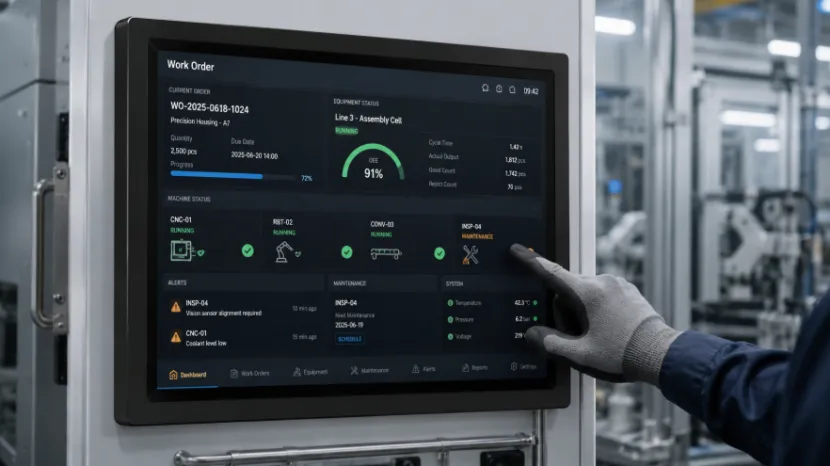
An industrial Android display for equipment monitoring can be placed beside key machines to show fault codes, running status, maintenance reminders, and inspection items. It can also act as an Android display terminal for industrial automation, especially when the display connects with factory software or browser-based systems.
Maintenance Records Become Easier to Check
A repair team can use an equipment monitoring display to view basic fault history, spare part notes, and planned service tasks. No one likes searching through a paper folder at 9 p.m. during an urgent repair.
How Do Android All-in-One Machines Make Work Order Display Easier?
Paper work orders are still common, but they are easy to lose and slow to update. A work order display system gives the line a clearer way to show tasks, process steps, material notes, and change notices.
Digital Work Orders Reduce Repeated Communication
A digital work order display system can show order changes, shift tasks, packaging details, and production instructions. If a supervisor updates the task, the screen can show the new information faster than printing another sheet.
Operators Can Check Instructions at the Point of Work
At an assembly station, the screen can display SOP pages, images, checklists, or short training videos. A touchscreen display for factory automation is useful when operators need to switch pages, confirm steps, or check the next process.
Why Is YIAISIGN Suitable for Smart Factory Display Projects?
For B2B buyers, the product itself matters, but the supplier’s project support also matters. Screen quality, Android system fit, customization, sample testing, and delivery stability all affect the final result. This is where YIAISIGN fits naturally into industrial display projects.
YIAISIGN is a smart display manufacturer with more than 15 years of experience in display screen development and production. Its product range covers Android all-in-one machines, digital signage, digital photo frames, calendar clocks, portable monitors, and other smart display products. The company supports OEM/ODM services, including hardware design, logo, interface, packaging, appearance customization, and software service. Its official site also mentions strong R&D, 4 production lines, and 3,000 pcs daily output, which is helpful for buyers who need repeat orders and stable supply.
The 32” Android All-in-One Machine uses a 32-inch 1920×1080 display, 16:9 ratio, Android 11.0 system, with Android 13.0 as an option. It is designed for high-definition display, smooth operation, low power consumption, hardware and software customization, and industrial automation use. For a custom Android all-in-one display for industrial use, these details are practical rather than fancy.
YIAISIGN’s smart display solutions also fit factory automation display projects where buyers need a smart factory display solution for production boards, machine-side screens, quality stations, or workshop notice areas.
Are Android All-in-One Machines Worth Using in Smart Factory Digital Management?
Yes, when the goal is to make factory data easier to see and act on. An Android all-in-one machine does not replace MES, ERP, PLC, or SCADA. It works as the visible front-end terminal. That role is important.
For smart factory digital management, an industrial automation display can bring production data, equipment warnings, work orders, safety notices, and training content to the shop floor. It is especially useful for production lines, equipment monitoring points, warehouse areas, quality inspection stations, and team notice boards.
FAQ
Q1: What Is an Android All-in-One Machine Used for in a Smart Factory?
A: An Android all-in-one machine is used for production data dashboard display, equipment monitoring, work order display, workshop information display, quality data, and factory notices.
Q2: Can an Android All-in-One Machine Be Used as a Production Data Dashboard?
A: Yes. An Android display for production data dashboard can show output, target quantity, order progress, downtime, defect rate, and shift performance.
Q3: Why Choose a Custom Android All-in-One Display for Industrial Use?
A: A custom Android all-in-one display for industrial use can better match factory software, brand interface, installation needs, operation flow, and batch project requirements.