
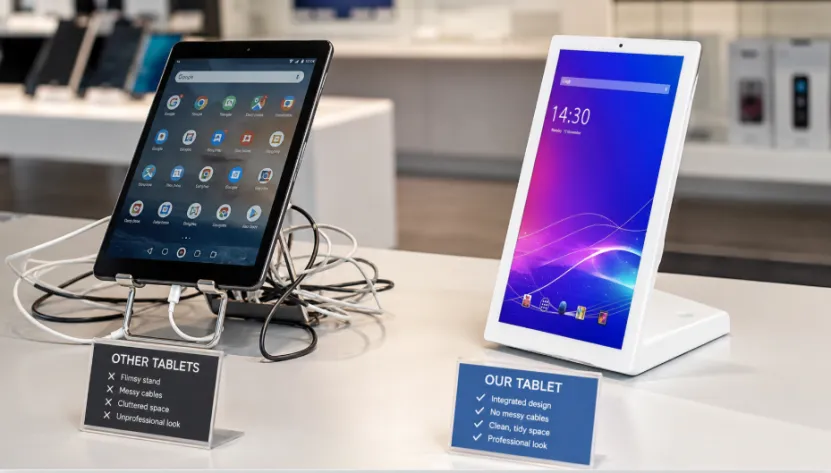
A standard tablet stand looks like a quick fix. You buy a consumer tablet, add a holder, plug in a cable, and the counter gets a screen. For a short event, that may work. But for retail counters, hotel desks, restaurants, clinics, showrooms, and service halls, the small problems become daily problems. Loose stands. Messy cables. Weak connections. Staff asking, “Why is the screen off again?”
That is why many B2B buyers compare a L-shaped Android tablet screen vs standard tablet stand before ordering. YIAISIGN, a professional digital display screen manufacturer with over 15 years of experience, builds smart screens for business and commercial environments.
Its product range covers Android all-in-one machines, digital signage, advertising machines, portable monitors, and custom display solutions. The 14 inch L-shaped Android tablet screen is made for smart desktop applications, with Android 14, RK3576 chip, Full HD IPS display, 10-point touch, camera, dual speakers, RJ45 LAN, WiFi, Bluetooth, 4GB RAM, and 32GB storage. For buyers who care about long-term counter use, those details are not decoration. They matter.
Why Do Businesses Still Choose Standard Tablet Stands?
A standard tablet stand is still popular because it feels cheap and simple. If you only need a temporary tablet setup for a pop-up event, small budget setup, or short-term counter display, this choice may be enough.
Lower Upfront Cost Feels Safe
For one store or one weekend event, a low-cost tablet display can handle a menu, sign-in page, or simple product video. It is easy to buy and easy to replace. But once you need ten, fifty, or hundreds of screens, the story changes. Each tablet, stand, adapter, and cable becomes one more part to manage.
Where Do Standard Tablet Stands Start to Create Problems?
A standard tablet stand often fails slowly, not dramatically. At first, it looks fine. After weeks of daily customer use, you may notice the loose tablet stand, messy cables, charging problems, unstable WiFi, and awkward screen angles.
Consumer Tablet Setup Is Not Always Counter-Ready
A consumer tablet setup is designed for personal use, not fixed business counter display work. In a restaurant, the POS display tablet may run all day. In a clinic, visitors may tap it every few minutes. In a showroom, customers judge your brand partly by the desk setup. If the tablet is tilted, cable-wrapped, or stuck in a cheap holder, it hurts the counter look.
What Makes an L-Shaped Android Tablet Screen Different?
A L-shaped Android tablet screen works more like an Android all-in-one machine than a tablet on a stand. The screen, base, system, camera, speakers, and interfaces are built into one desktop Android screen. That gives the counter a cleaner shape and fewer loose parts.
Integrated Desktop Design Feels More Professional
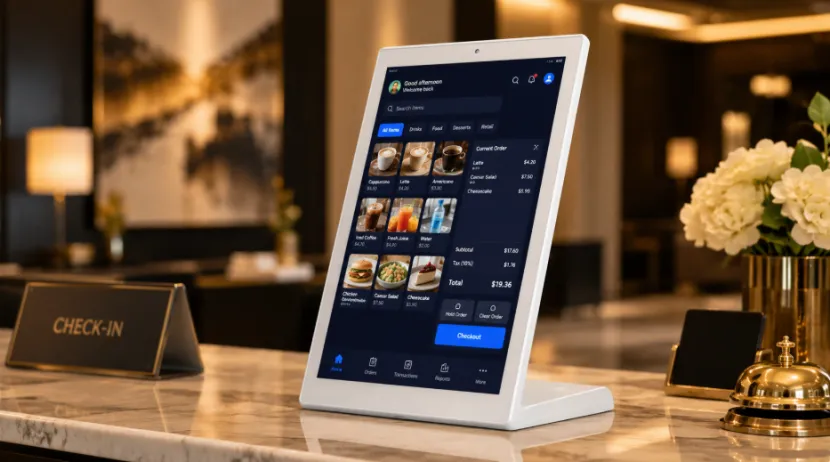
The L-shaped Android screen has a clear desktop form. It sits like a professional counter device, not a patched-together tool. For a retail counter display, reception desk, or desktop Android screen for interactive terminals, this makes a real difference. Customers may not say it out loud, but they notice tidy counters.
Which Option Is More Stable for Long-Term Operation?
For long-term commercial use, you need stable Android performance, not just a bright screen. The YIAISIGN commercial Android tablet screen uses an RK3576 chip for fast response, smooth multitasking, and continuous daily usage, has a 1920×1080 Full HD IPS display for desktop commercial use.
Daily Counter Tasks Need Better Hardware
A business counter display may run order pages, product videos, member sign-up forms, queue numbers, POS applications, or custom programs. A weak tablet can lag, heat up, or need restarts. Not every day, maybe, but enough to annoy staff.
Which Has Better Interfaces for Business Use?
This is where a standard tablet stand usually struggles. Many consumer tablets need adapters for printers, scanners, wired networks, and external devices. The result is a small jungle of cables behind the counter.
RJ45 LAN and Rich I/O Ports Help
An Android tablet screen with RJ45 LAN, WiFi and Bluetooth, and rich I/O ports is better for a POS display tablet or interactive business terminal. YIAISIGN’s product supports RJ45 LAN, camera, microphone, dual speakers, power adapter, and peripheral connections, making it more practical for Android tablet screen for POS applications and other business software deployment.
Which Is Easier to Deploy in Bulk?
For one device, a standard tablet stand may be manageable. For chain store deployment or project procurement, bulk deployment needs consistency. Same look. Same system. Same ports. Same packaging. Same support. Otherwise, every site becomes a different little project.
Custom Android Tablet Screens Reduce Project Risk
YIAISIGN supports customized digital displays, hardware design, logo, interface, packaging, production, and supply service. The company also mentions stable production, testing, quality control, multi-batch supply, and worldwide delivery.
For custom Android tablet screens and bulk Android tablet screens, this is the part B2B buyers should check before paying a deposit.
Which Is Better for Business Counters?
The best tablet screen for business counters depends on your use. A standard tablet stand works for short tests, low-traffic counters, and simple temporary business display needs. But for fixed commercial use, a L-shaped Android tablet screen is usually cleaner, steadier, and easier to manage.
Choose Based on the Real Workload
Choose a standard tablet stand for temporary use. Choose a commercial Android tablet for retail counter work, service desks, restaurants, showrooms, clinics, and POS display tablet projects that must run every day.
If you need an Android tablet manufacturer for custom Android tablet screens, YIAISIGN is a practical option because its products and services are built around business display projects, not just one-off desktop screens.
FAQ
Q1: Is a L-Shaped Android Tablet Screen Better Than a Standard Tablet Stand?
A: Yes, for fixed business counters. It gives you a cleaner desktop setup, better stability, richer interfaces, and easier long-term use.
Q2: When Is a Standard Tablet Stand Still a Good Choice?
A: It works for a short-term pilot project, pop-up event display, low-traffic counter, or small budget setup.
Q3: Why Does RJ45 LAN Matter for Business Counters?
A: RJ45 LAN gives a stable wired network, which is useful for POS applications, check-in systems, service counters, and customer-facing screens.
Q4: Can a L-Shaped Android Screen Run Business Software?
A: Yes. An open Android system supports commercial app installation, custom programs, media playback, and Android tablet screen for POS applications.
Q5: What Should You Check Before Ordering in Bulk?
A: Check Android version, chip, RAM, storage, touch performance, camera options, rich I/O ports, batch consistency, packaging, payment terms, and supplier support.


