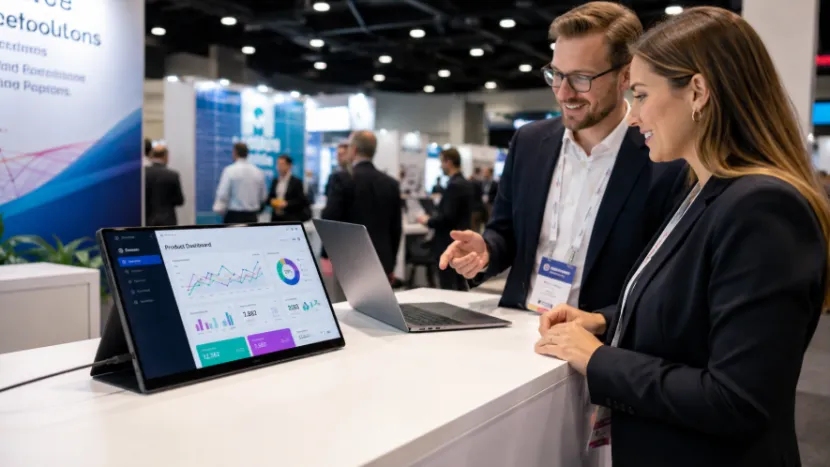
A trade show booth gets just a few seconds to grab attention. Posters share who you are. Still, they cannot show videos, live demos, QR codes, and client cases all at once. This is where a portable monitor for trade shows helps. It offers a neat and easy way to share more details. You do not need to pack huge screens or build heavy walls.
Event teams, retail pop-ups, and visiting sales reps need good gear. A YIAISIGN portable monitor acts as a handy digital display for trade show booth engagement. YIAISIGN makes professional digital display screens. They have over 15 years of experience in display products.
Their line includes portable monitors, digital signage, smart display devices, Android all-in-one machines, digital photo frames, and OEM/ODM display services. Business buyers get real value here. You get items made for travel, steady supply, custom tweaks, and real work use. These are not just pretty screens for ads.
Why Do Trade Show Booths Need a Portable Monitor?
At events, visitors walk fast. They talk, scan badges, and check phones while comparing booths quickly. Your message needs to be fast and visual. A portable exhibition display helps you show the right content before they walk away.
Static Posters Cannot Show Real Product Value
Posters work great for brand colors and short slogans. But if you sell software, tech, or design packages, buyers need to see the item move. A portable monitor for product demo can show a dashboard, video, or catalog. It can show before-and-after cases and pricing pages too. This feels much more direct. Also, a tiny laptop screen is awkward. When three people crowd around a table, a bigger second screen makes chats easier.
What Makes a Portable Exhibition Display Useful?
A good portable exhibition display must be more than just light. It needs to connect easily and sit nicely on a table. It also must look clear to folks standing close by. In real event work, tiny details count. A lost adapter or shaky stand wastes ten minutes, and on setup day, ten minutes feels like a whole hour.
Fast Setup Saves Time on Busy Booth Days
YIAISIGN’s 15.6-inch portable monitor is built for travel. It has a thin, light body and a Full HD display. It also offers plug-and-play use and many ways to connect. For a USB-C portable monitor for exhibitions, USB-C and HDMI support matter a lot. Booth teams often link laptops, tablets, phones, or media players. You need no extra software, so staff can plug in and start the demo right away.
Clear Visuals Make the Booth Look More Professional
A trade show display monitor must show crisp text and clean pictures. Smooth videos matter too. Full HD resolution is a solid base for slide decks, catalogs, and product videos. Wide viewing angles help a lot when guests stand at the side of your booth. This happens all the time in busy aisles.
How Can You Use a Portable Monitor for Product Demo?
A portable monitor setup for trade shows can stay very basic. One laptop, one portable screen, and one short product video work well. Adding a QR code page boosts the whole booth feel.
Use It as a Mini Digital Signage Screen
You can put a pop-up booth display screen on your front table and loop a short video. This lets you show off item perks, key specs, and daily uses. Just add a QR code for the catalog. This portable digital booth setup fits great in small spots because it adds moving parts without eating up space.
Use It for Sales Conversations
A portable monitor for business presentations helps sales staff show instead of just tell. You can open product match-ups, show case studies, or review quote sheets with guests. For dealer booths, the screen shows MOQ details, item types, and box options. For retail spots, a portable screen for pop-up retail booth use can show price deals, quick guides, or flash sales.
How Does a Portable Monitor Help With Lead Generation?
Getting leads is usually the main goal of an event. Guests might like your item, then forget your booth name after walking two rows. A portable monitor for lead generation gives you a clear spot to push the next step.
Put QR Codes Where People Actually Look
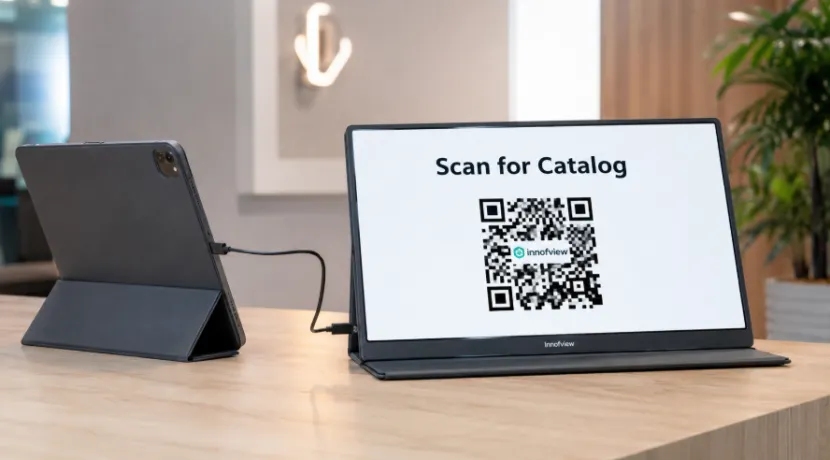
Do not hide QR codes on tiny paper corners. Put them right on the screen with bold words like “Scan for catalog” or “Book a demo.” A digital display for trade show booth use can swap between videos and sign-up forms. This means your booth keeps working while staff chat with others.
Reuse the Same Screen Across Events
A portable display solution for sales teams is handy after the event ends. The exact same screen supports client chats, hotel room prep, and office talks. It works for dealer training too. YIAISIGN’s portable monitor lineup handles business talks, multi-tasking, and mobile work desks. This makes it very handy for teams on the go.
How Should You Choose the Best Portable Monitor for Exhibition Booth Use?
The best portable monitor for exhibition booth use must fit your booth size, travel plans, and demo style. Do not pick just by price. A screen that is tough to connect or shakes on the table ruins the whole look.
Check the Core Features Before Buying
Look for Full HD resolution, USB-C and HDMI links, and simple plug-and-play setup. You also want a safe smart cover, a firm stand, low power use, and a light body. These traits make a portable display solution for exhibitions easy to pack, ship, and reuse. Buyers making big orders should ask about supply skills and custom limits. Asking about related digital signage for big booth zones is smart too.
FAQ
Q1: What Is the Best Portable Monitor for Exhibition Booth Use?
A: The best portable monitor for exhibition booth use needs to be light, clear, and simple to plug in. It must sit steady on a booth table. Full HD resolution, USB-C, HDMI, and plug-and-play setup are top traits.
Q2: How to Use Portable Monitors at Trade Shows?
A: If you want to learn how to use portable monitors at trade shows, start with product demos and looping videos. You can also show QR codes, browse catalogs, and give sales pitches.
Q3: Can a Portable Monitor Replace a Trade Show Display Monitor?
A: It can replace a huge trade show display monitor for small booths, table demos, and pop-up spots. For huge booths, it works great as a handy extra screen.
Q4: Is a USB-C Portable Monitor for Exhibitions Worth It?
A: Yes. A USB-C portable monitor for exhibitions cuts down messy cables. It speeds up setup time and works nicely with newer laptops and tablets.
Q5: Who Needs a Portable Display Solution for Sales Teams?
A: Sales crews, booth staff, dealers, and retail pop-up groups can use this. Trainers and traveling workers also need a portable display solution for sales teams when they want a fast second screen for demos.