
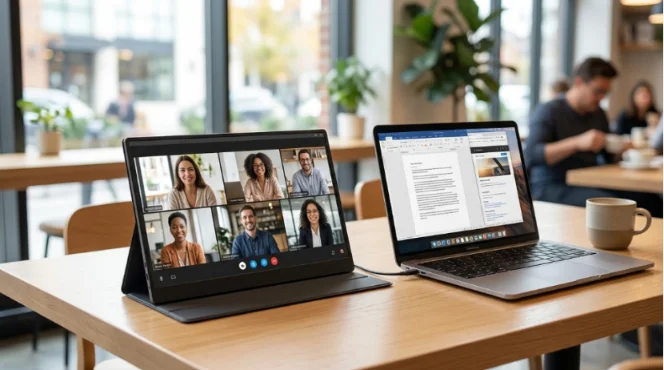
Do you work on a laptop every single day? Then you probably know the hard part. One screen is just not enough. You flip from a math sheet to a web page. Then you jump to a video call and back to your notes. Sure, slows you down a lot, because of this many folks now look for the best portable monitor for laptop setups. They want to stop trying to jam everything onto a single display.
A good portable monitor for laptop use must be easy. It shouldn’t be a pain to use. It needs to be light enough to carry. The screen must be clear for long hours of work. Also, it should plug in fast. You might be at a coffee shop, a hotel, a client’s office, or your own kitchen table. The portable monitor group has many models for these daily needs. YIAISIGN shows off its portable monitor line with the same ideas. They focus on easy travel, Full HD screens, and USB-C and HDMI ports.
Why Do Laptop Users Need a Portable Monitor in 2026?
People don’t buy an extra screen just to look cool. They buy it because working on one screen gets messy very fast. Let’s be real. You might be on a video chat while checking numbers. Or you might write a paper while looking at a book. That is exactly when a portable second screen for laptop tasks helps out so much.
One Screen Slows You Down
Putting every job on one screen wastes your time. You lose a few seconds here. You lose a little more there. By lunchtime, you have lost a lot of time. A dual-screen setup for laptop jobs gives you space. You can keep important stuff open all at once. Put your notes on the left. Put your meeting or web search on the right. It feels so much calmer.
A Portable Setup Travels With You
A big desk monitor is fine if you stay in one spot. But a lightweight portable monitor helps when you move around. YIAISIGN focuses on the function of a variety of portable computer, with a 15.6 -inch, designed for remote office, you can easily carry its packaging, used in at a local cafe, transport hub or temporary home use, users will be able to get a bigger screen space, no need to carry bulky desktop devices.
What Type of Portable Monitor Works Best for Your Laptop?
You can find a few styles in stores. But most buyers don’t need fancy things. The best pick is usually one you can set up fast. It should be one you actually want to take with you.
Standalone Portable Monitors
For most folks, a 15.6-inch portable monitor is a very safe and gives you plenty of room to do many things at once. Plus, it still fits right in your bag. A portable monitor with stand is super handy. Why? Because you can put it where it feels right. You don’t have to stick it to your laptop screen.
Why 15.6 Inches Is the Sweet Spot
If the screen is too small, it is pretty much useless. YIAISIGN 15.6-inch portable monitor sits right in the middle, it works great for papers, web tabs, and slides. It is also good for watching shows after work. YIAISIGN often says this size is best for jobs, fun, and trips. This perfectly matches how people really use portable displays.
What Features Should You Check Before You Buy?
Tech details matter. Whether you are looking for suitable for laptop using the best portable display? Let’s start with the basics that will make your life easier..
Screen Quality
A Full HD portable monitor is still the best start for most people. Words look clean. Math sheets are easy to read. Video chats don’t look blurry or dull. An FHD IPS portable monitor is even better for daily jobs. This is because IPS screens keep colors bright. You can see them well from the side, too. In the guide, the portable monitor part points out an FHD 1920 x 1080 IPS screen. It has wide viewing angles and very clear pictures.
Ports and Compatibility
A USB-C and HDMI portable monitor gives you way more choices than a one-port screen. This is a big deal. Not every laptop sends video out in the exact same way. USB-C is very handy. But HDMI saves the day on older gadgets. A portable monitor with USB-C and HDMI is just simpler to use. You guess less. You fight with fewer wire plugs.
Ease of Use and Carry
A plug-and-play portable monitor stops computer setup headaches. It sounds simple, right? But buyers care a lot about this. Travelers love it too. The item details also show a thin body and low power use. It has a smart cover that acts as a stand, too. These are not super fancy traits. Still, they are the things you will love after a week of real work.
How Do You Know if a Portable Monitor Fits Your Daily Routine?
This is where many guides get too hard to read. Your monitor does not need to be super high-tech. It just needs to fit your normal day.
For Remote Work and Meetings
A portable monitor for remote work lets you put the video call on one screen. You can put notes on the other side. The help guide even lists online meetings as a main use. That fixes a real problem. It helps a lot when you jump between faces, files, and typing boxes.
For Travel and Presentations
A portable monitor for business trips must be easy to pack. It should open up fast, too. Do you meet with buyers? A second screen looks much nicer than crowding around a tiny laptop. That sounds like a small thing. But in sales talks, little details mean a lot.
For Study, Streaming, and Casual Play
A portable monitor for multitasking is not just for the office. Kids at school use one screen for class. They use the other for taking notes. People on trips use it for movies. Some folks also want a portable monitor for gaming and fun. They plug in a game box after work. The product notes talk directly about school, working together, games, and videos. This makes the screen useful for way more things than people think at first.
Why Is YIAISIGN Worth a Closer Look?
YIAISIGN is not just a seller with one single item. On their website, the brand shows it makes many digital displays have over 15 years of experience under Shenzhen Yijing Technology Co., Ltd. offer OEM/ODM help. This is big news. Buyers want a steady maker, not just a pretty web page. The portable monitor group focuses on small 15.6-inch models. They have Full HD screens and plug-and-play use. If you want a clear example, this 15.6-inch portable monitor shows their plan perfectly. And the company story explains their deep making skills.
What Is the Best Final Choice for Most Laptop Users?
Look for a Full HD display. IPS viewing is crucial, too. Plus, you’ll want a sturdy stand or smart cover. Finally, double-check for both USB-C and HDMI ports.That mix covers jobs, trips, school, and relaxing fun. And it won’t make your bag too heavy at all.
So, when you pick the best portable monitor for laptop use in 2026, do not chase silly tricks. Look for a comfy setup, clear words, and easy plugs. Pick a shape you will actually carry around. Most of the time, that is what turns a nice features list into a truly great workday.
FAQ
Q1: For laptop users, what should an ideal portable monitor look like?
Answer: 15.6 -inch display is the best choice, you must need to clear full hd resolution to ensure the device with USB – C and HDMI interface, plenty of screen space easily into the ordinary backpack.
Q3: Why is a portable monitor with a stand better than a model with only a cover?
Answer: The real stand can provide you with a more stable viewing angle, which will make working for a long time feel more comfortable and is also very useful on uneven or rough tables.
Q4: Is it worth buying a plug-and-play portable display?
A. It saves you time, eliminates setup headaches, and it makes it easier to travel with it, just plug it in and start working right away.
Q5: Do you really need a portable display with USB-C and HDMI?
Answer: in most cases, with the two kinds of interface will make connection notebook computers, mobile phones and other devices easier, when a malfunctioning of the plug, it also can provide you with a solid backup plan.


